A decade ago, most research computing in life sciences meant genomics pipelines and molecular simulation running on CPU clusters. Today the frontier looks different.
Foundation models are trained on millions of pathology slides and single cells. Generative models propose new molecules and protein binders. Language models read clinical notes and protocols.
This work is GPU-hungry, runs for days or weeks, and is shared by many teams with competing priorities. It also has to meet the security and compliance expectations of a regulated industry. That combination is exactly what general-purpose infrastructure struggles with, and what Amazon SageMaker HyperPod was designed to handle.1
It also makes research computing a strategic decision rather than an IT purchase. The same GPU budget can produce very different amounts of science depending on how the platform is run.
In AI-driven science, compute is no longer a utility in the background. It is part of the experiment.
The shiftScience has become AI-native
Three shifts are reshaping what research organizations need from their infrastructure:
- Scale. Biological foundation models and large imaging models need many GPUs working together, connected by fast networking and fed by high-throughput storage.
- Duration. Training runs last days or weeks. At that length, hardware faults are a certainty, and each one can cost days of progress.
- Sharing. GPUs are scarce and expensive. Discovery, translational and clinical teams all need them, and leaders need to direct capacity to the highest-value science.
Infrastructure that treats every job as an isolated batch task, or every team as its own island, leaves value on the table. The question for research leaders is no longer whether to use GPUs, but how to run them as a shared, reliable, accountable capability.
The serviceWhat SageMaker HyperPod is
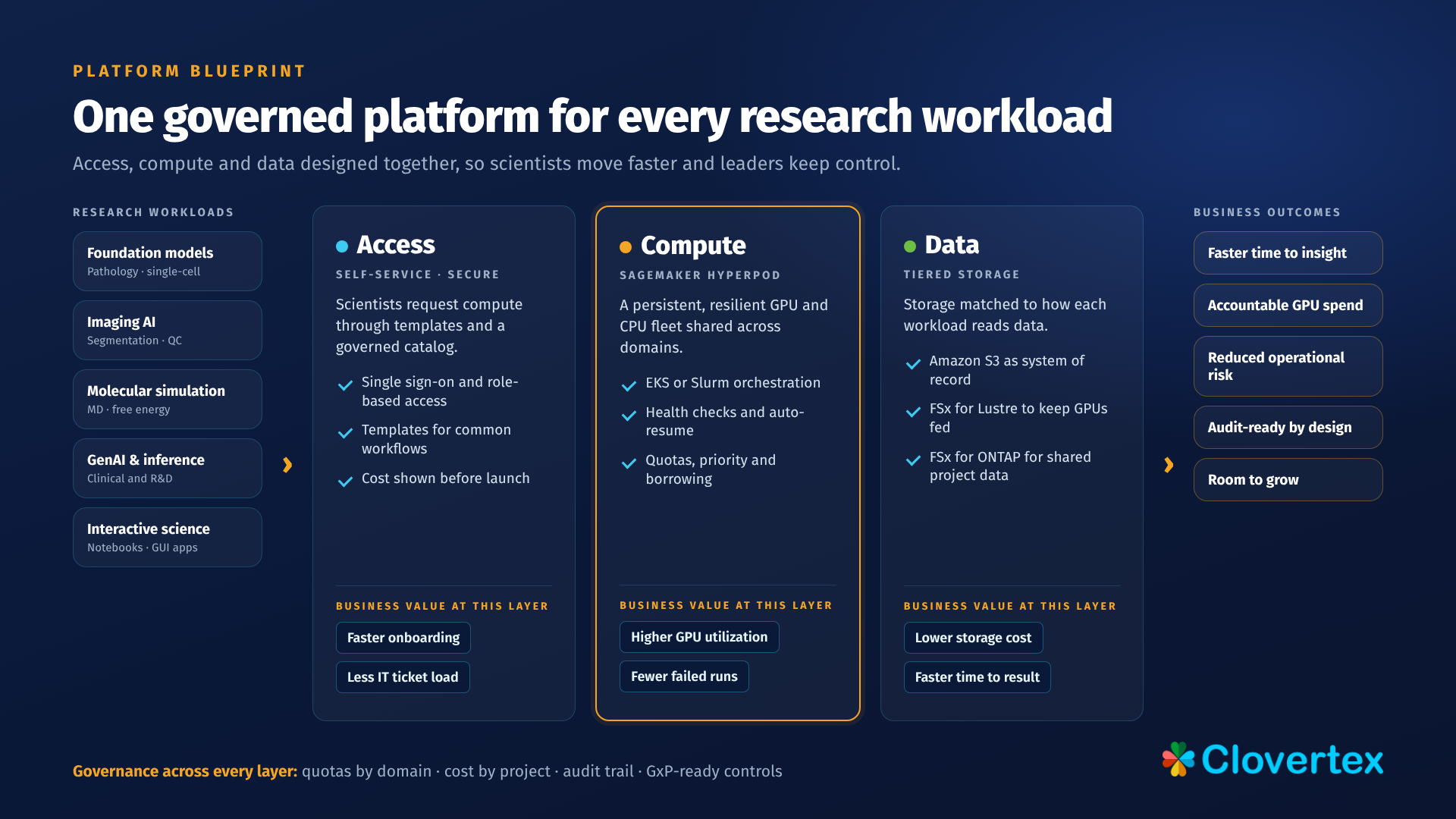
Amazon SageMaker HyperPod is a managed AWS service for building and running persistent clusters of GPU and CPU instances for AI training and inference. You control the cluster and its software. AWS manages the cluster lifecycle, monitors hardware health and repairs faults.1
Clusters can be orchestrated with Amazon EKS, for teams that work in Kubernetes,2 or with Slurm, for teams that live in batch scheduling.3 Around that core sit the pieces a shared research platform needs: governance, observability, capacity planning and model deployment.
CapabilitiesSix capabilities that matter for research
HyperPod's feature list is long. Six capabilities stand out for life science organizations, because each one maps directly to a research or business outcome.
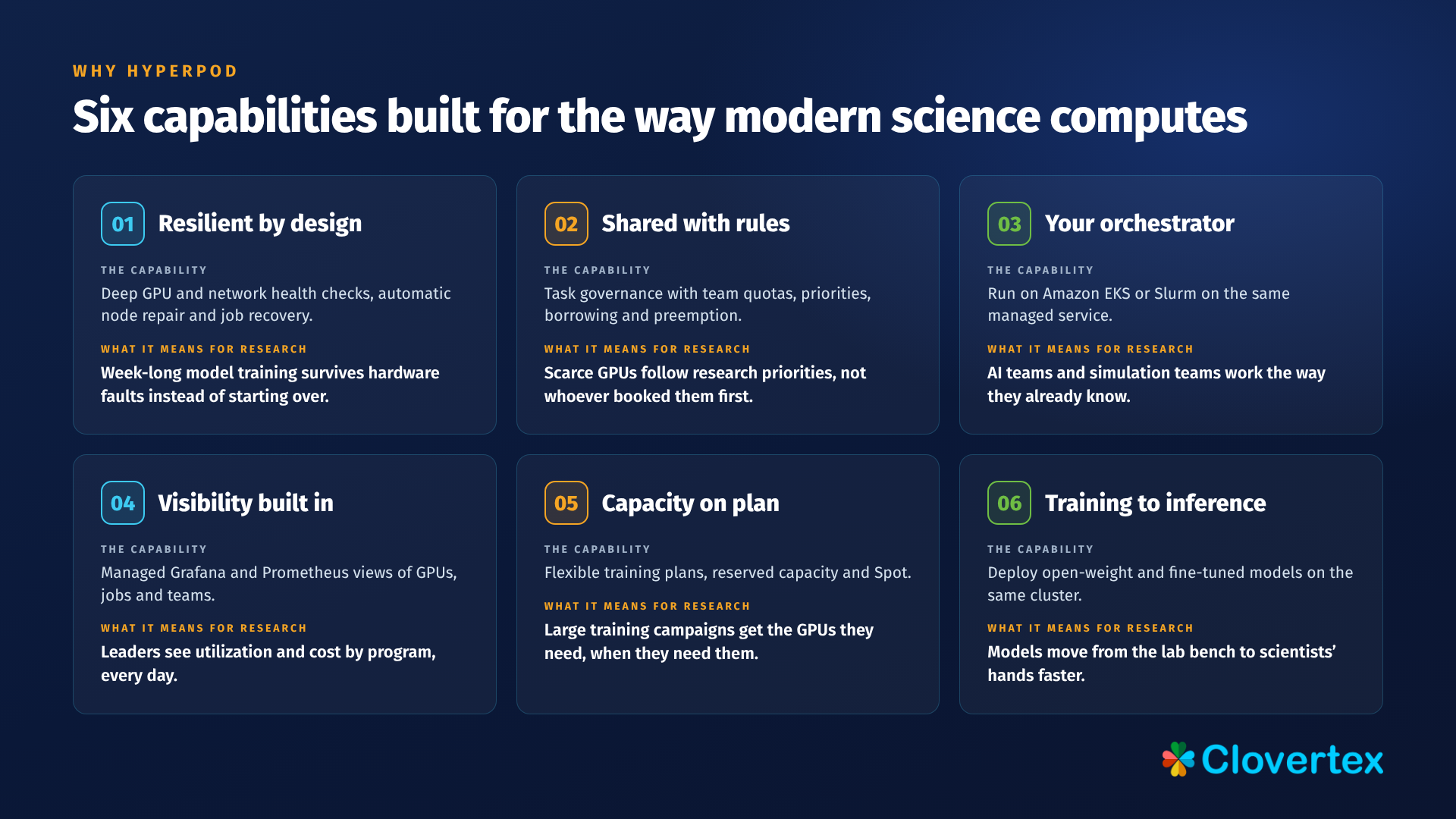
- Resilient by design. HyperPod runs deep health checks on GPUs and networking, replaces faulty nodes and can recover jobs automatically.4,5 For long training runs, that is the difference between a short pause and starting over.
- Shared with rules. Task governance lets administrators give each team a guaranteed quota, set priorities, let teams borrow idle capacity and reclaim it when needed.6,7
- Your choice of orchestrator. EKS and Slurm on the same managed service mean AI engineers and computational scientists can each work the way they know.2,3
- Visibility built in. Managed Grafana and Prometheus dashboards show GPU health, utilization and task status by team.8
- Capacity on plan. Flexible training plans, reserved capacity and Spot help match large training campaigns to available GPUs and budgets.9,10
- Training to inference. Open-weight and fine-tuned models can be deployed on the same cluster, so models reach scientists without a separate serving platform.11
The business caseMore science from every GPU dollar
For research leaders, the real cost of compute is not the price of a GPU-hour. It is how much of each paid hour produces science. Seen that way, four levers determine the return on a GPU platform, and HyperPod is designed to pull each of them.
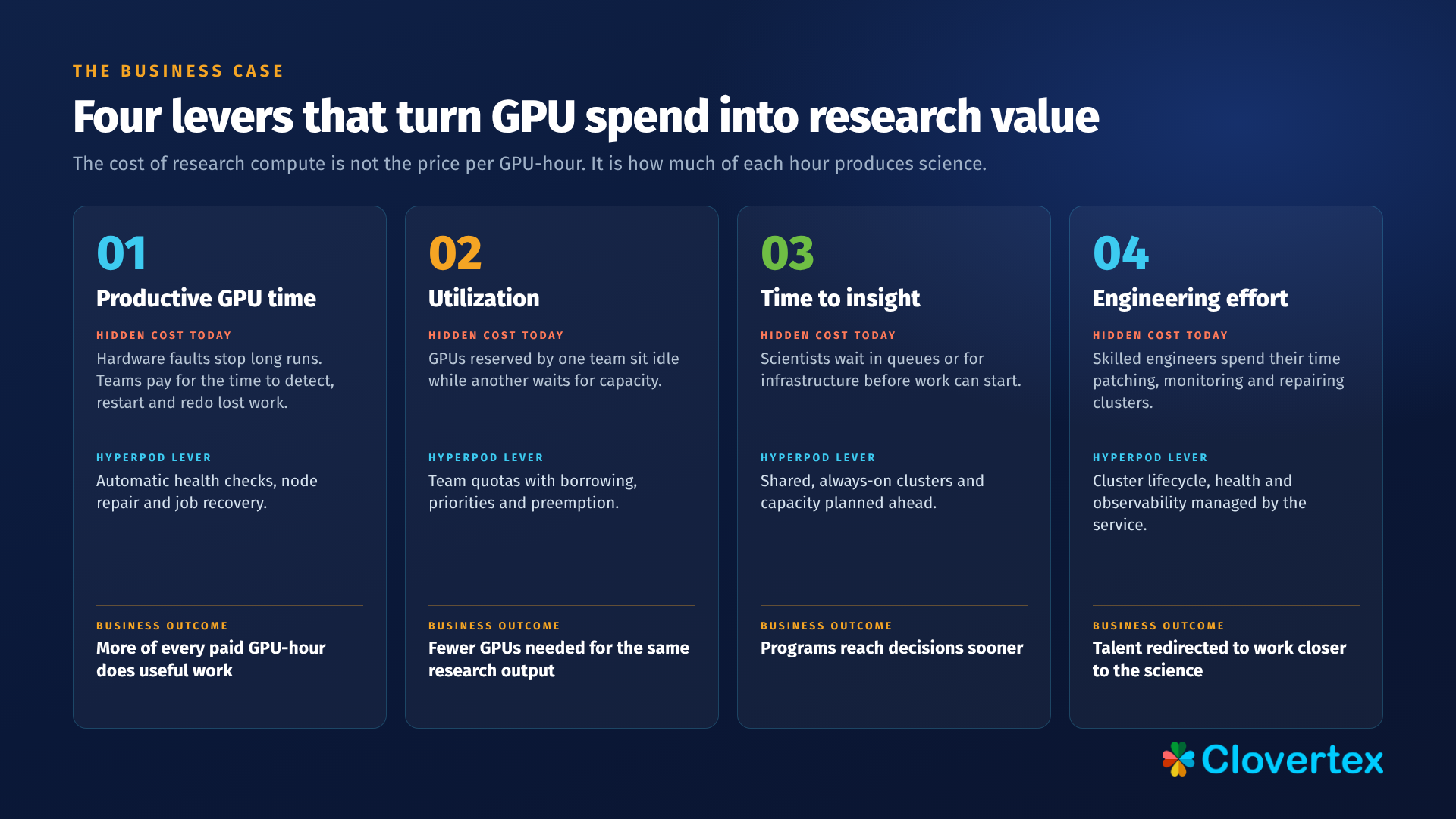
- Productive GPU time. Every hardware fault on a long run costs the time to notice it, replace the node, restart and redo the work since the last checkpoint. Automatic detection and recovery shrink that loss. AWS reports that with HyperPod's checkpointless training, more than 95% of training time on large clusters is spent making progress.12
- Utilization. When each team owns its own GPUs, capacity is sized for every team's peak and sits idle the rest of the time. Shared quotas with borrowing let the same fleet serve more research,6 which can defer or reduce new capacity purchases.
- Time to insight. A scientist waiting a week for capacity is a program waiting a week for a decision. In drug development, where time to milestones drives value, that delay has a cost that rarely appears in an infrastructure budget.
- Engineering effort. Specialist HPC and MLOps engineers are scarce. Time spent patching nodes, chasing failed GPUs and building dashboards is time not spent helping scientists.
A worked example (illustrative)
Consider a foundation-model training run on 128 GPUs for 21 days: about 64,500 GPU-hours. Assume four hardware interruptions, each costing eight hours of cluster time to detect, replace, restart and recompute lost work. That is roughly 4,100 GPU-hours, over 6% of the run, paid for without producing results, and more than a day added to the schedule.
Repeat across a year of training campaigns and several teams, and resilience stops being a technical feature and becomes a budget line.
Assumptions are for illustration only. Actual fault rates and recovery times vary by workload, scale and configuration.
None of these levers shows up in a comparison of hourly instance prices. Together, they often decide whether a GPU investment pays back.
Use casesWhere HyperPod fits across the R&D lifecycle
Because it supports both AI training and inference, one HyperPod platform can serve workloads from early discovery to clinical research.11
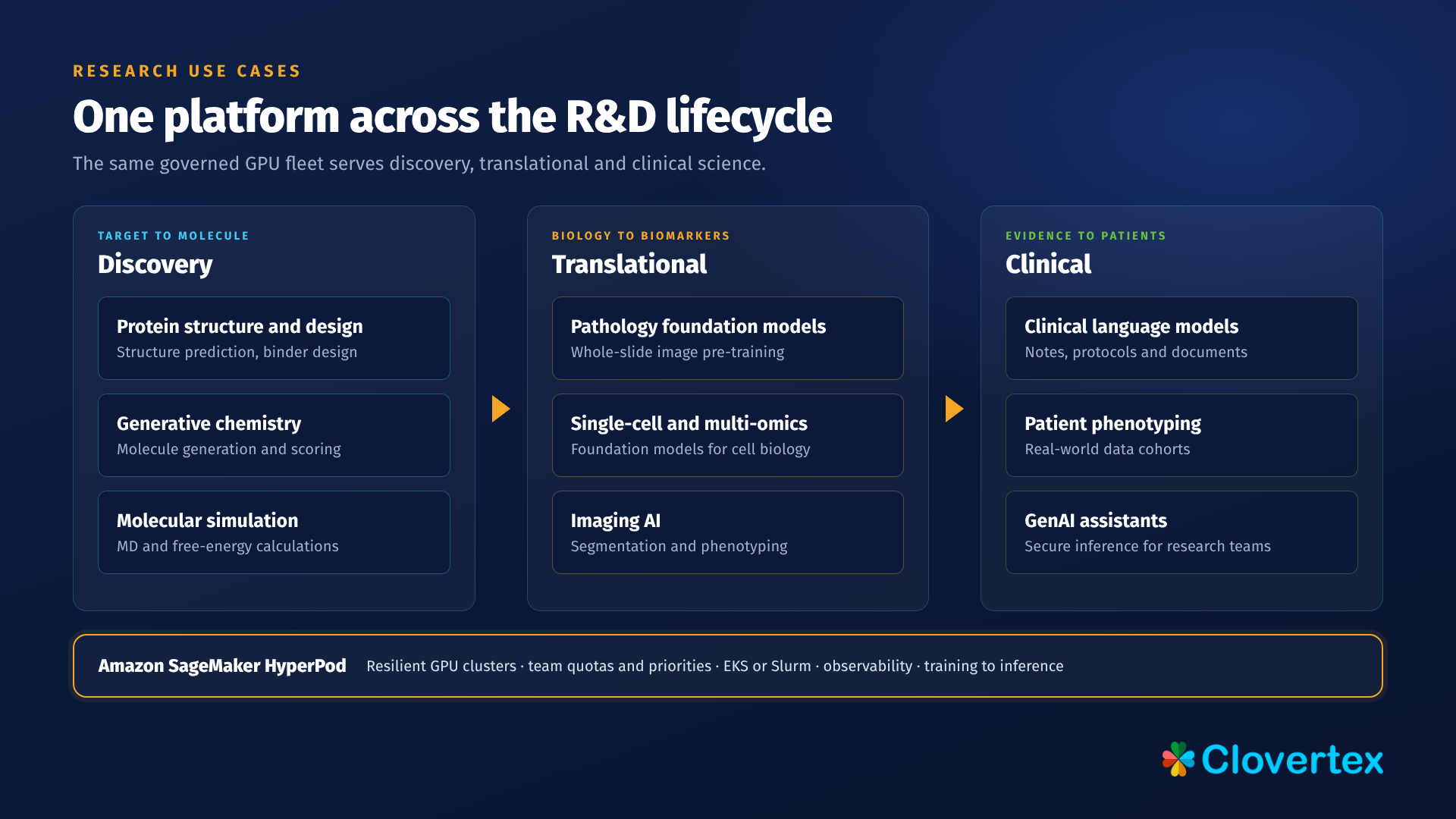
- Discovery. Protein structure prediction and design, generative chemistry and molecular simulation all benefit from on-demand access to large GPU pools.13
- Translational research. Pathology and single-cell foundation models are among the most demanding training workloads in the industry, and the most sensitive to hardware faults.13
- Clinical research. Language models for clinical documents, patient phenotyping on real-world data and secure GenAI assistants need inference close to sensitive data, with strong controls.
The comparisonHyperPod, PCS or ParallelCluster?
AWS gives research organizations three ways to run a cluster. All three can run Slurm on GPU instances, so the scheduler is not what separates them. The difference is how much of the cluster AWS operates for you, and how much is built in specifically for AI.
- AWS ParallelCluster is the AWS cluster management tool that builds Slurm clusters in your own account.14 It adds no service charge beyond the resources it uses,15 but your team operates what it builds, including patching, troubleshooting and upgrades.16
- AWS Parallel Computing Service (PCS) is managed Slurm. AWS runs the Slurm controller and scaling logic and applies patches and upgrades, while you keep familiar Slurm controls such as fair-share, QoS and preemption.16,17 It adds an hourly controller fee and a per-node management fee on top of the EC2 instances.18
- Amazon SageMaker HyperPod is a managed cluster built for AI. It runs Slurm or Amazon EKS, and makes GPU resilience, team governance and model deployment part of the service.1 You pay for HyperPod instances by the hour, plus connected services such as storage.19
Put simply: ParallelCluster is a tool you run, PCS is managed Slurm, and HyperPod is a managed AI platform. ParallelCluster and PCS run the same kinds of HPC work; what separates them is who operates the cluster.
Which one should you choose?
Two questions, asked in this order, settle most decisions.
These questions are a starting point. The comparison below, and the signals that follow it, refine each branch.
| Capability | AWS ParallelCluster | AWS PCS | SageMaker HyperPod |
|---|---|---|---|
| What it is | Cluster management tool you run | Managed Slurm service | Managed AI cluster service |
| Who operates it | Your team: head node, scheduler, patching and upgrades | AWS runs the Slurm controller, scaling and upgrades | AWS runs the cluster lifecycle, hardware health and repair |
| Typical workloads | “Classic” HPC such as genomics pipelines, MPI simulation, molecular dynamics, and CPU or mixed batch, on a cluster your team self-manages, often to mirror an on-premises cluster | The same “Classic” HPC workloads, on Slurm that AWS manages for you | Multi-node GPU training and fine-tuning that runs for days or weeks, plus inference, across molecular modeling, generative AI, medical imaging, and clinical model training and inference |
| Orchestration | Slurm (other schedulers only if your team installs and runs them)14 | Slurm only17 | Slurm or Amazon EKS (Kubernetes); EKS can also host tools such as Run:ai2,3 |
| Slurm version | The version bundled with your ParallelCluster release20 | Choose a supported version (25.05, 25.11 or 26.05); patches applied for you17,21 | Included in HyperPod AMIs for Slurm clusters, or use Amazon EKS, with tools such as Run:ai where you run them22 |
| Customization | Custom AMIs, Slurm settings outside a deny-list, and custom bootstrap code on the head node20,23,24 | Custom AMIs and allow-listed Slurm settings; the controller is managed by AWS25,26 | Custom AMIs and lifecycle scripts on top of HyperPod AMIs22 |
| Hardware faults | Replaces failed static nodes;27 GPU faults diagnosed by your team | Reschedules the affected job at the highest priority17 | Stress-tests GPUs, EFA and NCCL before nodes take work, replaces faulty nodes and auto-resumes jobs4,5 |
| Long training runs | Restart from your own checkpoints | Restart from your own checkpoints | Automatic resume, plus checkpointless recovery on EKS12 |
| Sharing GPUs across teams | Slurm fair-share and QoS that admins configure | Slurm fair-share, QoS and preemption on a managed controller | Team quotas, lending and borrowing, priorities and per-team usage reports (EKS)6,28 |
| Interactive work | Login nodes and tools your team installs | Login nodes from a compute node group29 | JupyterLab and Code Editor spaces on the cluster (EKS)30 |
| Monitoring and observability | Built and maintained by your team | Cluster capacity and utilization metrics in CloudWatch17 | Amazon Managed Prometheus and Grafana, NVIDIA DCGM GPU metrics, and dashboards for tasks, training and inference8 |
| GPU capacity | EC2 capacity you provision | EC2 capacity you provision | Flexible training plans and Spot, built into the cluster9,10 |
| Model serving | Build your own | Build your own | Deploy open-weight and fine-tuned models on the same cluster11 |
| Pricing | EC2 and other resources only | EC2 plus controller and node management fees | HyperPod instance hours plus connected services |
| Things to consider | Upgrades, patching and troubleshooting are all yours | Less customization: allow-listed settings and no controller access | SageMaker instance pricing; several features are EKS-only; overkill for CPU-only batch |
| Best fit | “Classic” HPC where your team wants full control of the stack | “Classic” HPC without running the Slurm control plane | Shared, GPU-heavy AI training and inference |
Capabilities as documented by AWS at the time of writing. Several HyperPod features apply only to clusters orchestrated by Amazon EKS, as noted.
What HyperPod adds that PCS does not
PCS and HyperPod are both managed, and both can run Slurm. The difference is that PCS manages the scheduler, while HyperPod manages the GPU fleet and the AI work running on it.
- GPUs are proven healthy before they take work. HyperPod stress-tests each new GPU node with NVIDIA DCGM diagnostics, EFA network tests and multi-node NCCL tests, and keeps it out of the queue until it passes. Nodes that fail are replaced automatically.4 PCS keeps the scheduler running and reschedules jobs when a node has a problem,17 but AWS does not document an equivalent GPU validation step.
- Long runs recover without starting over. When a node fails mid-run, HyperPod replaces it and resumes the job automatically from the last checkpoint.5 On EKS, checkpointless training recovers from healthy peers in place, and AWS reports more than 95% goodput on deployments of over 2,300 GPUs.12
- Kubernetes as well as Slurm. PCS supports Slurm only.17 HyperPod also runs on Amazon EKS,2 so AI engineers who work in containers get the same managed resilience as computational scientists who work in Slurm.
- GPU sharing between teams is a product feature. On EKS, task governance gives each team a guaranteed quota, lends and borrows idle GPUs, enforces priorities and preemption, and reports usage per team for chargeback.6,28 With PCS or ParallelCluster, the same outcome depends on Slurm fair-share and QoS policies that administrators design and maintain.16
- Training and inference on one cluster. Open-weight models from SageMaker JumpStart and your own fine-tuned models can be deployed onto the cluster that trained them, with governance deciding when inference takes priority.11 Neither PCS nor ParallelCluster includes model serving.
- Notebooks and IDEs next to the GPUs. On EKS, scientists can open JupyterLab or Code Editor spaces directly on the cluster, with access to the same file systems their training jobs use.30 With PCS or ParallelCluster, interactive work usually means a login node and tools your team sets up.
- AI-level visibility out of the box. A one-click add-on creates Amazon Managed Grafana and Prometheus dashboards for GPU health, tasks, training and inference.8 PCS reports cluster capacity and utilization to CloudWatch.17
- GPU capacity you can plan. Flexible training plans reserve GPU capacity for a fixed window, and Spot adds lower-cost capacity for work that can tolerate interruption.9,10
Several of these capabilities, including task governance, checkpointless training and model deployment, apply to HyperPod clusters orchestrated by Amazon EKS. Teams that choose HyperPod with Slurm still get deep health checks, automatic node replacement and auto-resume.4,5
Signals that refine the choice
Choose SageMaker HyperPod for multi-node GPU training or fine-tuning that runs for days or weeks. In those jobs a single failed GPU is costly, and HyperPod's deep health checks, automatic node replacement and auto-resume pay for themselves.4,5 It is also the natural home when teams want Kubernetes, managed quotas and GPU sharing, notebooks on the cluster, or inference alongside training.2,6,11,30 It is not the best fit for CPU-only batch work: HyperPod bills SageMaker instance hours,19 and those workloads would pay for AI capabilities they do not use.
Choose AWS PCS for classic HPC such as genomics pipelines, MPI simulation, molecular dynamics, and CPU or mixed batch, when you want AWS to run the Slurm control plane.17 PCS is a separate, fully managed service, not a hosted version of ParallelCluster.16 You still choose your Slurm version and can bring custom AMIs,21,25 and accelerated jobs on GPU, Trainium or Inferentia instances can run alongside simulation.17 The trade-off is customization: Slurm settings are limited to an allow-list, and the controller is not yours to log into or modify.26
Choose AWS ParallelCluster for the same classic HPC workloads when the team wants to own everything: custom images, Slurm settings beyond what a managed service allows, bootstrap code that reshapes the head node, unusual network or storage setups, or close parity with an on-premises cluster.20,23,24 It also runs in more AWS Regions than PCS today.16 The software adds no service charge, but you run it: upgrades, patching and troubleshooting are on your team, and the Slurm version moves with the ParallelCluster release you deploy.15,16,20
When comparing costs, look beyond the hourly rate. ParallelCluster has no service charge, PCS adds controller and node fees, and HyperPod bills by instance hour.15,18,19 The total cost of a GPU platform also includes the engineering time to run it and the GPU time lost to faults and idle capacity. For GPU-heavy AI, those hidden costs are often where HyperPod's business case is won.
The choice is rarely either-or. A common pattern is HyperPod for foundation-model training and inference, PCS or ParallelCluster for classic simulation and pipelines, depending on how much of the stack a team wants to run, all under shared identity, storage and cost reporting.
DesignDesigning it well for science
A managed service removes much of the undifferentiated work, but research platforms still succeed or fail on a few design choices:
- Storage that keeps GPUs busy. Use Amazon S3 as the system of record, Amazon FSx for Lustre as high-throughput scratch for training,31 and shared file storage for home and project data. Map user and group identities consistently across all of them.
- One source of truth for quotas. Pick a single system to manage queues and priorities. Two systems competing to schedule the same GPUs create confusion nobody can debug.
- Showback before chargeback. Publish cost by team and program daily,28 and measure GPU utilization, not just allocation. Teams adjust once they can see their own usage.
- Compliance as code. Define the platform as code so change history and test evidence are produced automatically. Keep regulated workloads in clearly separated, controlled environments.
- Scientific validation. Involve scientists in defining what “working” means, from matching results to familiar tools and remote desktops. Trust drives adoption more than features do.
MeasurementWhat leaders should measure
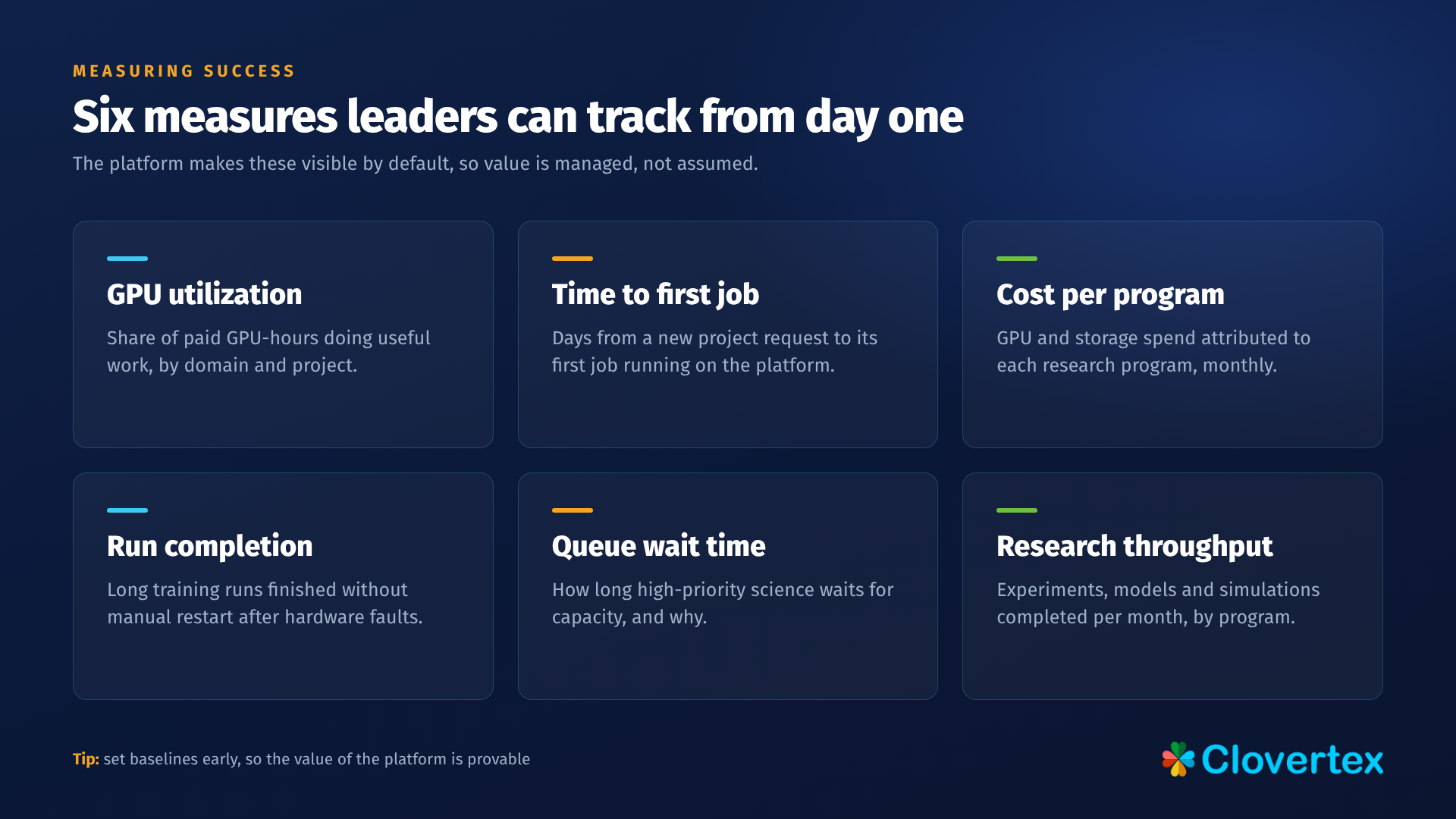
A research platform should be judged on outcomes. HyperPod makes many of the right measures visible by default,8,28 so value can be managed rather than assumed.
What this unlocks
Faster time to insight
Capacity flows to the highest-priority science instead of sitting idle.
Accountable GPU spend
Every GPU-hour is attributed to a program, so investment follows impact.
Lower operational risk
Resilient training and consistent controls protect long, expensive runs.
Room to grow
New programs and models start on a platform that is already in place.
What's nextLooking ahead
The next wave of life science research will be shaped by foundation models for biology, lab-in-the-loop experimentation and AI agents that work alongside scientists. All of them depend on GPU infrastructure that is reliable, shared fairly and easy to reach.
For leadership, the decision comes down to one question: how much science does each GPU dollar buy? A managed platform that keeps GPUs healthy, shared and visible is designed to raise that number, while freeing scarce engineers to focus on research.
SageMaker HyperPod brings much of that as a managed service. The organizations that benefit most will pair it with thoughtful design around data, governance and the scientists who use it every day.
SourcesReferences
AWS documentation and AWS blog posts referenced in this article.
- Amazon SageMaker HyperPodAWS Documentation, Amazon SageMaker AI Developer Guide
- Introducing Amazon EKS support in Amazon SageMaker HyperPodAWS Machine Learning Blog
- Orchestrating SageMaker HyperPod clusters with SlurmAWS Documentation, Amazon SageMaker AI Developer Guide
- Deep health checksAWS Documentation, Amazon SageMaker AI Developer Guide
- Automatic node recovery and auto-resumeAWS Documentation, Amazon SageMaker AI Developer Guide
- SageMaker HyperPod task governanceAWS Documentation, Amazon SageMaker AI Developer Guide
- Maximize accelerator utilization for model development with new Amazon SageMaker HyperPod task governanceAWS News Blog
- Amazon SageMaker HyperPod observability with Amazon Managed Grafana and Amazon Managed Service for PrometheusAWS Documentation, Amazon SageMaker AI Developer Guide
- Reserve Flexible Training Plans for ML workloadsAWS Documentation, Amazon SageMaker AI Developer Guide
- Spot instances in Amazon SageMaker HyperPodAWS Documentation, Amazon SageMaker AI Developer Guide
- Deploying models on Amazon SageMaker HyperPodAWS Documentation, Amazon SageMaker AI Developer Guide
- Checkpointless training on Amazon SageMaker HyperPod: Production-scale training with faster fault recoveryAWS Machine Learning Blog, December 15, 2025
- Applying multimodal biological foundation models across therapeutics and patient careAWS Machine Learning Blog, April 23, 2026
- What is AWS ParallelClusterAWS Documentation, AWS ParallelCluster User Guide
- AWS ParallelClusterAWS product page
- What’s the difference between AWS ParallelCluster and AWS Parallel Computing Service?AWS HPC Blog, October 28, 2025
- AWS Parallel Computing Service FAQsAWS product page
- AWS Parallel Computing Service pricingAWS product page
- Amazon SageMaker AI pricingAWS product page
- Slurm configuration customizationAWS Documentation, AWS ParallelCluster User Guide
- Slurm versions in AWS PCSAWS Documentation, AWS PCS User Guide
- Amazon SageMaker HyperPod AMIAWS Documentation, Amazon SageMaker AI Developer Guide
- Building a custom AWS ParallelCluster AMIAWS Documentation, AWS ParallelCluster User Guide
- Custom bootstrap actionsAWS Documentation, AWS ParallelCluster User Guide
- Software installers to build custom AMIs for AWS PCSAWS Documentation, AWS PCS User Guide
- Configuring custom Slurm settings in AWS PCSAWS Documentation, AWS PCS User Guide
- AWS ParallelCluster processesAWS Documentation, AWS ParallelCluster User Guide
- Usage reporting for cost attribution in SageMaker HyperPodAWS Documentation, Amazon SageMaker AI Developer Guide
- Using an AWS PCS compute node group to provide login nodesAWS Documentation, AWS PCS User Guide
- IDEs and Notebooks on SageMaker HyperPodAWS Documentation, Amazon SageMaker AI Developer Guide
- Amazon FSx for LustreAWS product page